Starting on vtubing with as little spending as possible!
It can feel like you need to spend just so so much money to start in vtubing, but you can do it for free or very cheap! And I feel like a lot of the online resources focus on the model and not much else. So let’s talk shop!
Here’s what this is: An overview of ways to save money starting out, and some tips to test and ways to approach early vtubing spending.
What this is not: An in-depth discussion of how to use and optimize your model/gear. There are way better tutorials out there on getting started with VTube Studio, VSeeFace, and more! And I’m not covering 'how to grow as a vtuber,' this is only about your first setup.
To start, the minimum stuff you need to stream is:
- Your model (likely a PNGtuber, more on that coming up)
- Tracking software for the model
- A computer that’s not an absolute complete potato
- A microphone
- Headphones
- OBS or similar software for running your stream
- Overlays/setups for OBS (a good minimum: a Starting Soon, Be Right Back, Ending Stream, and a chatting/gaming scene. But you’ll need at least one setup for chatting/gaming to start.)
To start vtubing you do not need:
- A webcam or iPhone
- A fancy model
- A fancy computer
And here's a way to jump around the sections since this is chonky!
- Budget thoughts
- A note on Etsy and Fiverr
- Spend time on your design
- Start with PNGtubing
- VRoid vs PNGtubing
- What about Live2D?
- Microphones
- Streaming Room Treatment
- Let's talk headphones!
- Free bots!
- Free/cheap overlays!
- Free chat widgets!
- Stream Deck for free!
- Let's talk computer specs
- Case Study: my own starting setup
- I'm lost help me
First: Spend as close to nothing on vtubing to start as you can.
Because right now, you don’t even know if vtubing is fun for you or something you have time for. And that’s good! It’s great to run tests and try new things and see what you think! And as much as I love vtubing, a lot more goes on behind the scenes than most folks realize, from learning to puppet your model expressively to the ins and outs of bots and planning for special events. And if your goal is to make money, honestly it would be faster to learn Blender or digital art and make vtuber assets or even get a more traditional job. (And yes that’s even accounting for the state of the economy.)
I like thinking here about a concept in business called the Minimum Viable Product (MVP), or basically the bare minimum to get your concept to market. While this concept has to be taken with a massive grain of salt, right now you’re going to be looking at so, so many ways to spend your money and cool shiny vtuber tech tools and artists to hire and you want to Not Do That Yet. Soon, once you’re sure you’re having fun and know what tools you specifically need and build a budget for that, but not right now.
On top of that, the world of vtubing tech can be overwhelming, especially if you compare yourself to established big vtubers, or even established indie vtubers who’ve been streaming for a while. Almost everyone starts out much much smaller than what you’re seeing now, and so should you! So you can build an MVP setup to start and add upgrades as you go that match your vibes!
And I totally get wanting the Ultra Shiny Beautiful Model and Best Possible Microphone to debut to all your adoring fans! That’s a wonderful dream! But a fancy model and a Shure SM7B won’t matter if you find out you dislike the reality of vtubing in a week.
Also: Please stay away from Etsy and Fiverr
At this point both are so full of AI assets and scammers that they’re not worth your time unless you’re buying from an artist you know actually made the art and likely found and confirmed was an artist elsewhere. Instead I’d start with VGen and working directly with artists/artist groups that you’ve verified make their art. (There are real artists on Etsy and Fiverr, but they’re so much the exception that I can’t suggest a newbie look for artists on either site.)
And just in case, you should avoid AI art not only because it’s art theft, but because it will absolutely impact your ability to work with vtuber artists down the road. Many artists don’t work with AI references or a history of AI art, especially on VGen.
Spend some time on your vtuber design before you dive in
Because most likely the very first design you choose isn’t what you truly vibe with as a vtuber, and a huge way to save money is to reduce the number of times you change your design. (Like I was originally going to be a cinnamon and vanilla themed baking witch vtuber if you can believe it!) Also there’s a kind of dysphoria or disconnect that can happen when you’re not a good mesh with your concept and that’ll negatively impact your streams, so you want to really do your best to make sure things click.
Here are some videos on vtuber design from Squiiji, and another from Yam Albat that helped me, and even grabbing a few test options from Picrew (see more info on Picrew below) can really help! You can also hire someone to do character design or buy an adoptable, but this usually starts at $50 on VGen for base price + commercial rights (which you'll want down the road) and goes up quickly, so keep that in mind!
Start with PNGtubing
If you're brand brand new to vtubing, there are three main types of vtuber models: PNGtubing, made of 2+ static images that respond to you talking with software like Veadotube; 3D/VRoid, a 3D model type mostly made with VRoid Studio or Blender; and Live2D, a rigged 2D image rigged mainly with Live2D software. (Live2D is what Hololive and big vtubers use if this is all super new, and indie vtubers use a mix of all three!)
And I think you, brand new vtuber, should start with PNGtubing!
Not only can PNGtubing be started for free, you don’t need any tracking hardware (webcam/iPhone/etc) to use a PNG model so there’s extra potential savings right off the bat! And Veadotube and Rahituber and the other PNGtuber software tools are lightweight and free!
And if you aren’t sure what your model should look like and/or want a free PNGtuber option, Picrew’s your new best friend! It’s an online website where you can make online paper dolls made by various artists, and some are set up specifically to use for free for vtubing! (Just 1000% read the fine print twice over, as basically none offer commercial rights on the art and they’ll have specific credit requirements to follow. Respect the wishes of the artists!)
To get you inspired, here are some PNGtuber options I found on Picrew!
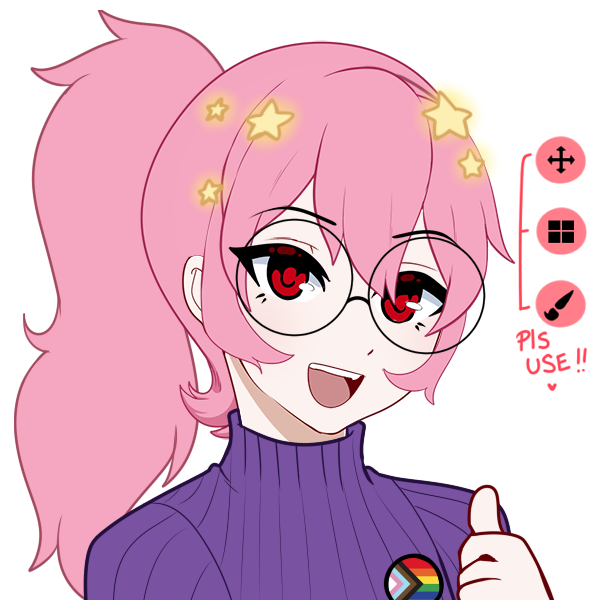
Faelions' Avatar Creator is a classic and so cute!
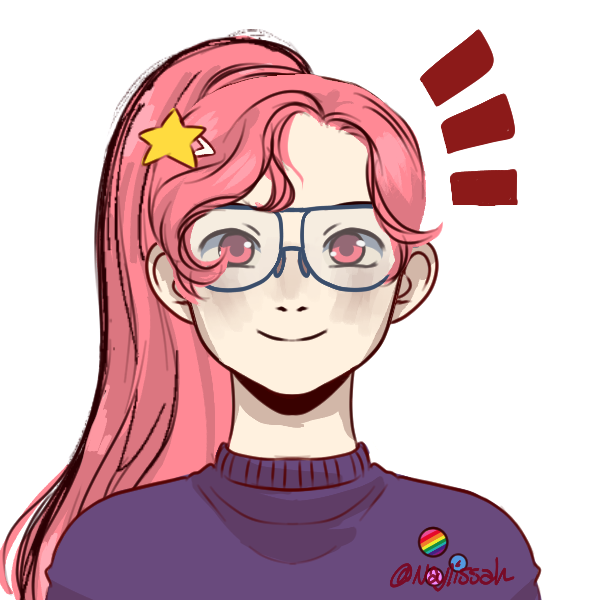
Naylissah's Black Centered Picrew has options for a ton of hair styles and a lovely soft sketchy style!
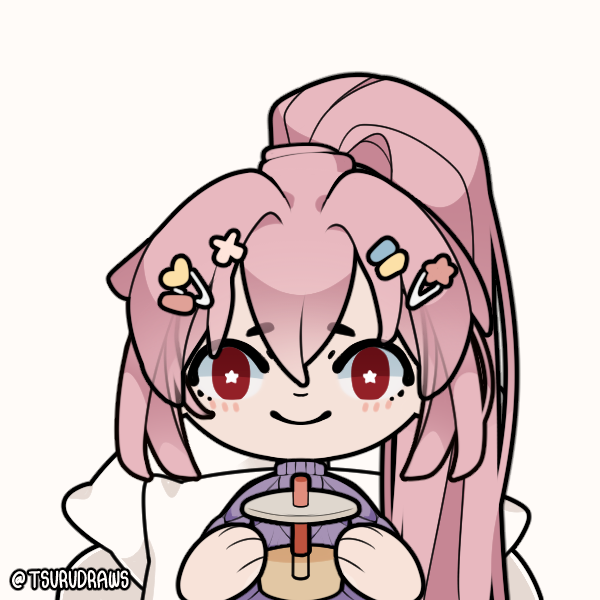
Tsurudraws's Tsucrew has such a cute chibi style and some great toggle options!
Still want something custom and aren’t up for drawing it yourself? VGen’s the place to look! It’s an online commission marketplace and you can get a PNGtuber there starting at ~$10 USD, and the prices will jump up to $200+ because PNGtubing isn’t just 2-4 static images nowadays, they can be as complex as Live2D models with layers and mouse tracking and effects and more! Best of all, if you started with a picrew model you like you’ve already got a reference for your new artist!
VRoid versus PNGtubing
I love my VRoid model so so much! It makes me so happy! But VRoid tracking is more system intensive for your computer than any of the PNG tracking software options, and you’ll also need tracking hardware like a webcam or iphone in order to really shine (along with adding on ARKit blendshapes for the best expressions), so I’m recommending PNGtubing over VRoid to start.
That being said, you’ve got a computer that can handle tracking options like VSeeFace/VNyan/Warudo and you love VRoid models? Go for it! You can make a model from scratch for free in VRoid Studio, and BOOTH is full of free/cheap add ons if you’re not artistically inclined! And you can commission one for ~$50-$500! (As a heads up most VRoid artists will also offer ARKit blendshapes, but as an add-on, so check the fine print!)
If you want to make your own model I will give a heads up that VRoid Studio can be intimidating at first, especially if you lack an art background and/or 3D modeling experience. That being said, the tutorial videos out there are solid! I made my first model with my mouse and yelling at VRoid tutorials for hours, it’s really doable!
And you can do VRoid tracking without a webcam thanks to VMagicMirror, it just might not be the effect you’re after. (I tested it early on though and it can look really cool!)
VRoid pro tip: Make sure to install Spout2 before you start streaming, it's free and it'll make your model so much less memory intensive and can help a ton with OBS lag! (You'll hear about Spout2 for Live2D but it's also great for VRoid models!) I used this video for my install, it's for Live2D but will still walk you through the install process! You'll set up Spout2 as a capture type in OBS and then capture your tracking software through Spout2 instead of game/window capture. Yay!
But I want to start with a Live2D model!
Live2D models are great! They’re what get most of us into streaming as vtubers, the dream of Being Anime!
But now you’ll need: a computer good enough for running VTube Studio + all your other streaming needs, a webcam (and ideally an iphone) for tracking, likely some amount of lighting to help with tracking, and unless you get a really cheap premade model, money to cover both the art + rigging for a custom model (which just in case usually art and rigging are separate services) or the art/skills to draw and rig your own model.
There are more affordable starting Live2D models than ever, I ran a test with a $5 model when I was starting out, customizable models like PRISM usually run $100-$150, and VGen is full of chibi/scrungly/your character here (YCH) models starting at $20 for rigging and tracking. (Like my full body MSPaint model from Sylphrin and bobcgames for rigging + tracking starts at $130 and it’s a joy!) But right now we’re talking Saving Money, and this is the most expensive route. And if you decide you want to be a goblin queen after all instead of the unicorn fairy you first commissioned, now you’re out all that money spent on the original model.
What microphone do you already have?
Most likely you have a microphone somewhere in your house already even if it’s not yours, maybe your spouse uses one for meetings or your roommate has one for co-op gaming. Borrow that for now, offer to bake cookies or plan your streams after their work hours if you have to. Yes it’ll be likely meh audio, but the point right now is *any* audio. (And yes everyone will tell you Audio Is King in streaming and it is! But right now you still haven’t decided if you like streaming, so a meh mic is better than no mic!)
If you have any money and/or lack a microphone, I’d look around before buying new? Blue Yetis are available in most thrift stores, and a ton are even online at eBay and Goodwill for $10-$50 (Goodwill’s options will be cheaper but also riskier for the mic working). If you’re near a college town, you might even find them cheaper on craigslist or at a university surplus or being given away, there are that many spare Blue Yetis running around. Fifine’s also got cheap solid mics to get you started too if you’d like something new and affordable.
Also making sure your mic is correctly positioned and investing ~$10 in a clip-on pop filter can make a huge difference over getting a better mic at first!
What’s your streaming room like?
A badly treated room (think bare walls and wood floors) is a huge problem for your mic, it’ll make things reverb and sound really off.
Thankfully there are a lot of tutorials online for treating a room for streaming and voice acting, but the TL;DR is to cover all the wood/bare surfaces (which include walls and windows) you can with fabric to stop the sound from bouncing, from rugs to sheets to pillows. Grab what you can from around your house to make the room super plush and literally hear the difference!
Let's talk headphones!
You likely already own some headphones, so that's great! If you do though they're likely not ones you've worn for hours before, so I'd test them for comfort, but something is better than nothing.
I started out with headphones I had and now stream with modded KOSS KSC75 headphones that I built using this tutorial, they're under $30 and surprisingly comfy! (Like seriously don't use the plain KCS75 ear pads at the very least, they're not comfy at all.) That being said doing the tutorial was honestly kinda scary, like I thought I was going to break the headphones the whole time, so be ready for that?
Bare bones basic bots and OBS
OBS is the main software right now for streaming, and it can get really intense for CPU/Memory, so for now make the scenes very, very simple to start, worry about getting fancy later.
You’ll want a few free bots to make your stream easier to run: Sery_Bot, which runs on Twitch and can help a ton for keeping spammers at bay, and I’d suggest Streamerbot over Firebot or Mix It Up Bot for memory usage as Firebot alone requires about double the memory of Streamerbot. (Streamerbot can be super intimidating, but there are some great intro tutorials! And if you have the memory on your computer Firebot and Mix It Up Bot are more beginner friendly!)
Some folks will suggest using StreamElements because you can add chat and commands from one source, but it’s fairly memory intensive, and honestly will only get you through the absolute beginning of your bot/commands journey as the command options are super limited. OBS plus bots offers a lot more flexibility for less memory, it’s so nice!
Overlays and assets for free/cheap
There are a lot of free overlays to get you started out there! A lot of artists offer free/cheap/pay what you can on ko-fi and VGen for overlays and emotes, especially nowadays in VGen shops. (I’d avoid worrying about paid OBS transitions between scenes for now, which are known as stinger transitions, OBS has internal free options to get you started!)
Also there are plenty of public domain assets and art pieces to help you get something custom! And free art tools like Krita and Photopea!
I used to recommend Canva for non-emote starter assets, and the free option can let you make your starting setup just fine, but as Canva gets more and more AI dense, I can’t safely recommend it. But in full disclosure my initial overlay setup was fully made in Canva using modified artist-made assets, and it worked great until I had time to plan and draw my current setup.
Not sure what to make your overlays look like? I'd ask yourself what the core of your vtuber concept is, and then see what elements you can highlight in the overlay! Like my core is 'comfy + educational geeky vtuber' and so I've got comfy chairs and books and plushies of indie game characters! But even having things in your colors is great!
Like here's my current chatting overlay: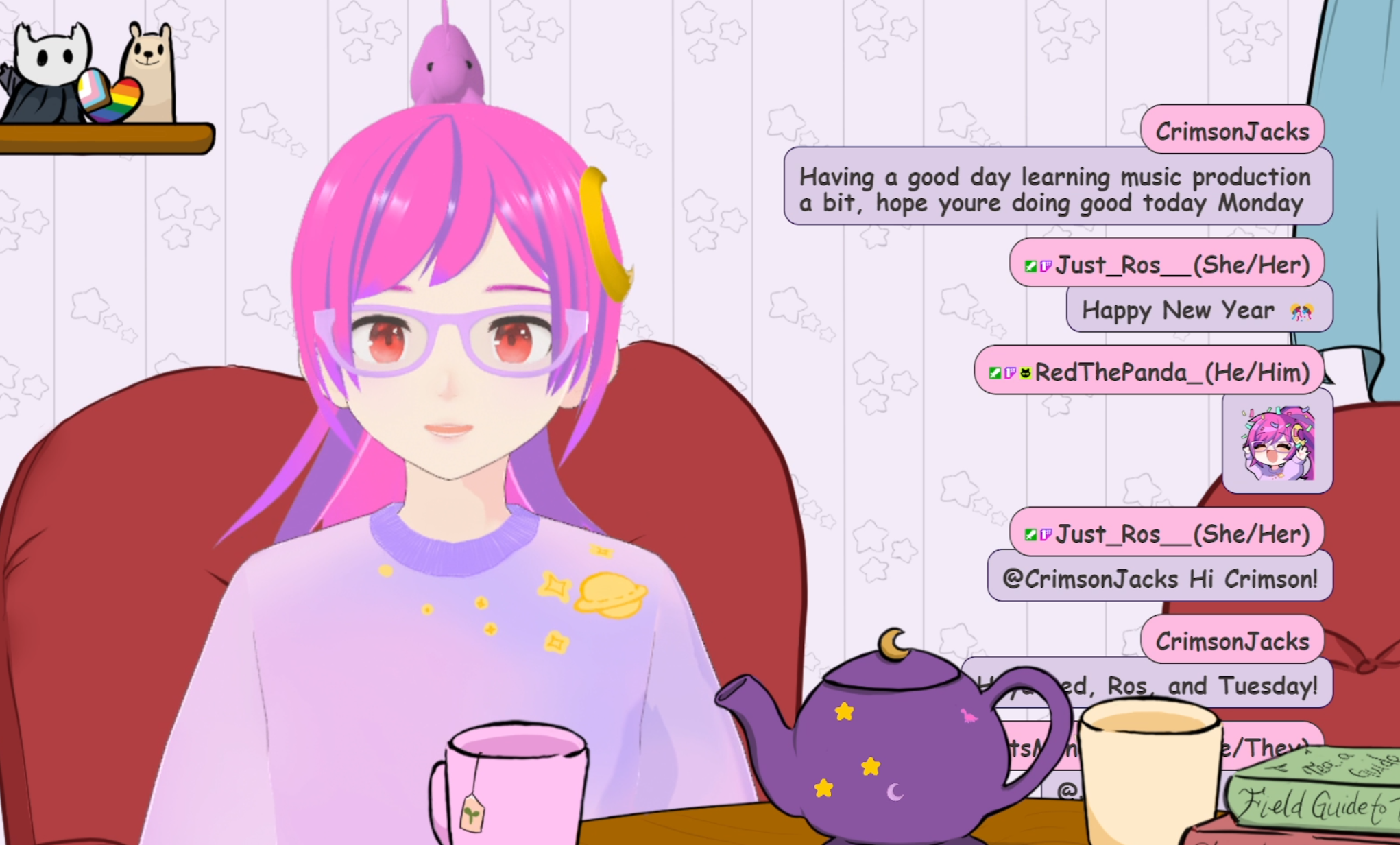
But my original overlay was 'well let's go with a vague space theme and some pink! yeah!'
What matters is getting started, you can always improve it later!
And again Etsy is not safe, it’s almost exclusively AI assets unless you know the artist’s work well.
Free/cheap custom chat setups
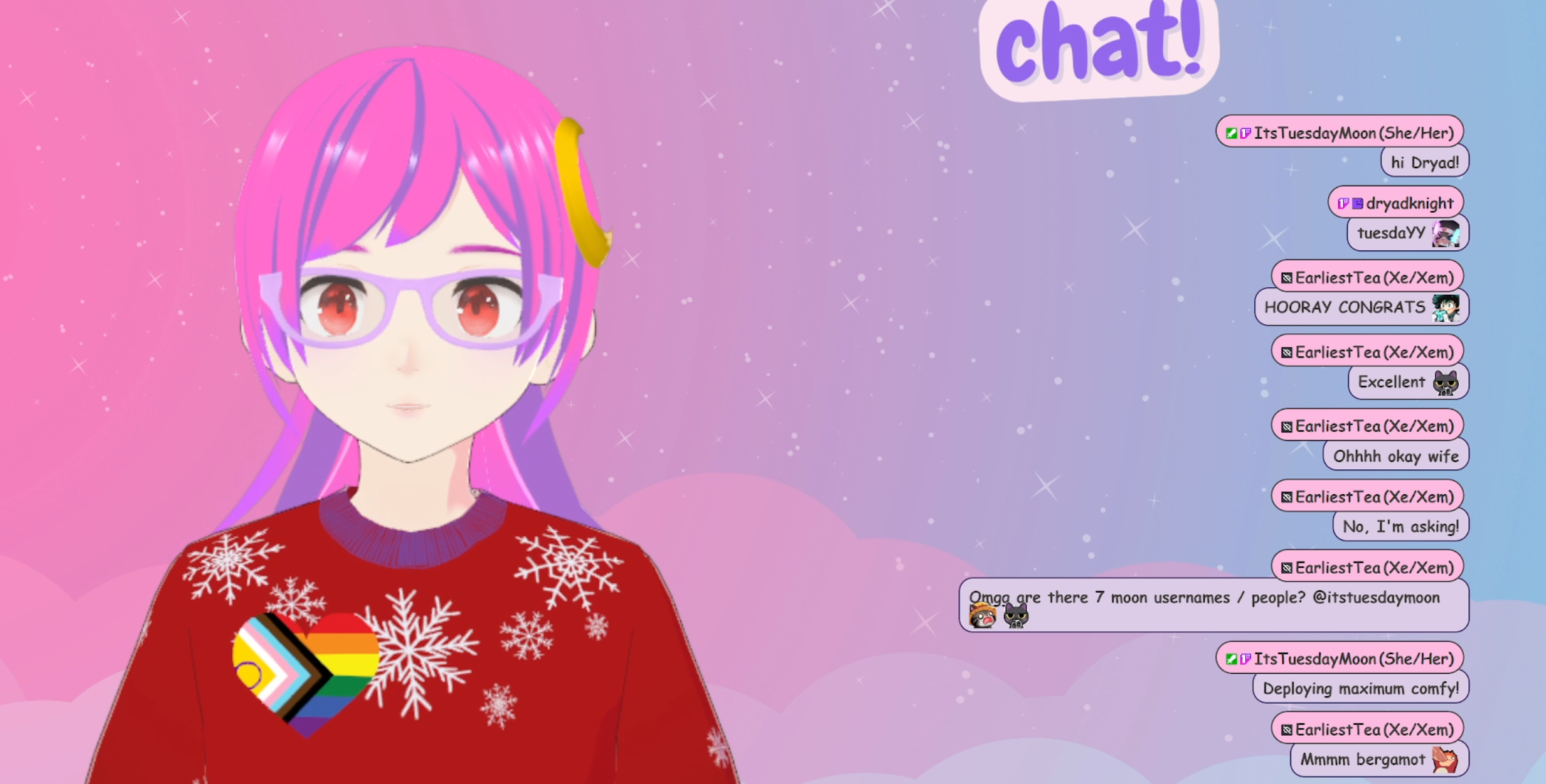
Want a pro-looking chat widget, but have no budget? There are two great options for you, Slime2 and Squonk Chat!
I use Slime2, it's got both premade themes and you can customize it, all for free!
Squonk Chat is super customizable and looks really clean and snappy, and it's free/pay what you can!
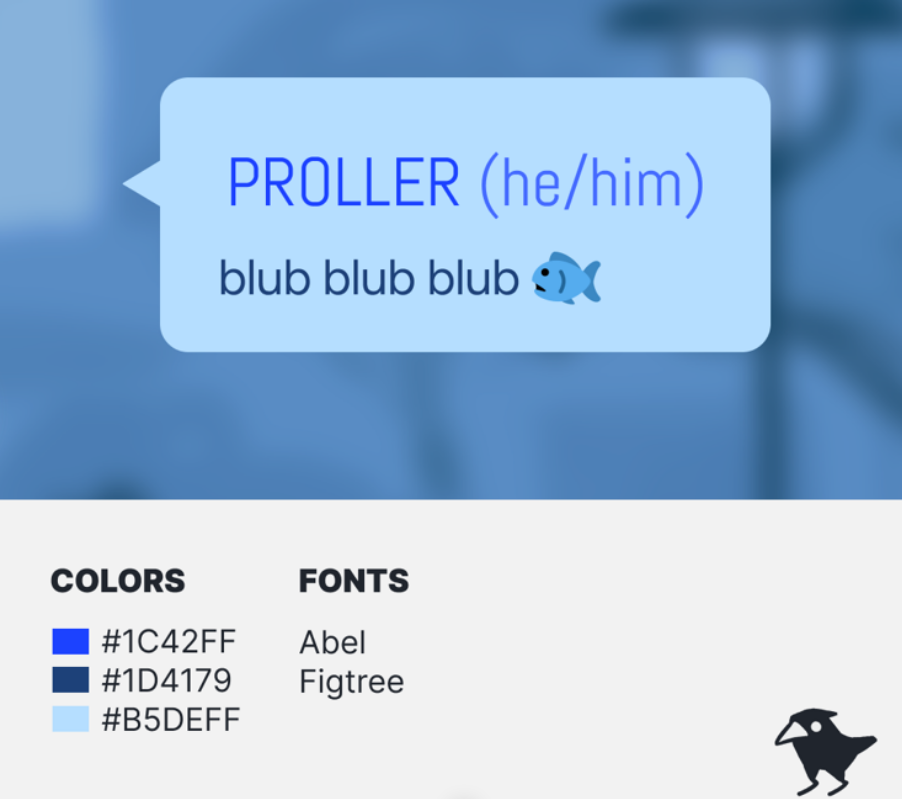
Image from Squonk Ko-fi info
Stream Deck for free!
Want a basic Elgato Stream Deck and have a mobile phone but no budget? There’s a free app for that! No really!
I used that early on to see if I even wanted a stream deck. It’s only got six buttons (more if you pay for Pro) and you will want to keep your phone charged, but it at least gets you started. (I ended up getting my stream deck used for about half off, but I was checking online auctions for over a month.)
How potato is your computer?
The more potato/older it is, the less you can do, but that doesn’t mean you can’t stream, more you might want to sit down early on and really figure out what you can stream without OBS crashing every five seconds.
To start, it’s worth getting a baseline. I’d turn on everything you need for streaming - OBS, Veadotube/your model, all your bots - and then go to Task Manager (Activity Monitor on Macs or System Monitor on Linux) and check how bad the Memory and CPU usage actually are. If there are any glaring memory/CPU hogs (Firefox) now’s the time to turn them to minimum usage to stream if you can’t close them entirely (so like only Twitch Creator Dashboard for your internet browser).
Now turn on a game you’d like to stream and see how things look on Task Manager. To be even more thorough, I’d set up a screen record setup on OBS with Task Manager visible, hit record (NOT stream) and play the game for a bit, then watch the recording and check Task Manager and the overall quality. If you’ve got some amount of space/things aren’t a lagging mess, it’s worth a test! Otherwise you’ll want to find something less intensive, and there are curated Steam lists for exactly that. Retro games can be less intensive when emulated as well, but your mileage there will vary.
If your computer is super ultra potato, like you can barely watch Twitch normally, streaming games is going to be tough. Either you’ll need to update your system, or you need to really ask yourself what you can stream right now. Maybe you stream really simple emulated retro games with a minimal setup, and save up for better gear!
Case Study: my initial setup
So here’s how much I spent and where with my own starting setup!
Model: $40/$7* (VRoid, Hanatool with VSeeFace tracking)
I made my own VRoid model, and I did hire the awesome LUK4 to make my initial blendshapes, but my actual debut model’s blendshapes were made by me and I bought Hanatool to make it happen! You do not need Hanatool or blendshapes to start with a VRoid model, in fact to start with VRoid you can just edit the base blendshapes in the Expression Editor that's built into VRoid Studio and that’s already better than a lot of VRoid tracking.
Overlays: Free*/(Officially $120, could be $2)
I already had Canva for work at the time, so I paid nothing out of pocket. However Canva would have charged ~$2 for what I made if I had the free setup since I used a modified template.
Microphone: Free, Blue Snowball
It was what I had in the house
already, though I ended up putting it on books each stream to get
the right height.
Headphones: Free I had a pair for listening to music already, and I only upgraded to the modded KOSS setup after I'd been streaming a bit and realized the headphones were giving me a headache.
Webcam: Free, Logitech Brio
I stole my wife’s work webcam (by asking nicely) to run the first tests.
Computer updates: None
My computer isn’t great, but I
didn’t do any updates specifically for vtubing and still haven’t.
(I really should though, the VODs are killing my hard
drive.)
For reference, here are my computer's specs, which are several years old as of writing this in 2026 and generally don't die on me:
Tech: Free (OBS, Firebot, Slime2)
I actually initially started with StreamElements, and once I moved to OBS for more flexibility I jumped to Firebot and later a Firebot + Streamerbot setup.
Total out of pocket spending to start vtubing: ~$50/could have been free
I'm super lost help me
All this is too overwhelming? That's okay! It's time to Do Some Research!
Find at least three vtubers whose setups you like at a range of sizes, and then do a little case study on them. Dig into their about pages, look at the credits. What tools do they use, what artists? What do you like/dislike about their setups for you and, more importantly, why do you like or dislike each piece?
By the time you've done your first you'll likely have a good idea of what you're after, but I suggest 3+ to get a more well-rounded idea of what you want, along with more suggestions of stuff to try. (That and you shouldn't just one to one copy anyone's setup, that's not comfy - and likely won't be a perfect fit for your needs anyway.) If you're lost by three that's still okay, but you'll likely have more of an idea of what you want than you started with. And it's okay to take this on one piece at a time! So maybe first you look over three chat setups, then three overlays. There's no rush here!
So what now?
First, take a deep breath. Because that's a lot to read! Congrats!
Give yourself a bit to think, maybe go for a walk or make yourself a nice snack, then go and look over your vtuber plans, step by step.
Are you still liking your model? Do you really need that logo you were thinking of hiring? Get things down to your vtuber MVP, and make sure they're what you need, not what I or anyone else says you need.
And if you've been thinking of hiring an Etsy vendor with 20+ keywords in the item title, maybe it's time to look at VGen?
No matter what I'm rooting for you, and I can't wait to see where you go!